Introduction: Why Everyone Talks About Mac Battery Life
Mac battery life opinion is one of the most searched topics today—and for good reason.
When people think of a MacBook, they immediately think:
- Long battery life
- Silent performance
- All-day usage without panic
But here’s the honest question:
👉 Is Mac battery life truly best in class, or does it just feel better than Windows laptops?
After using a Mac daily for work, browsing, writing, video streaming, and light editing, I decided to share a real, human Mac battery life opinion—not marketing claims, not lab tests.
In this article, you’ll get:
- Real usage experience
- Honest pros & cons
- Simple explanations (no tech jargon overload)
- A clear verdict
My Mac Battery Life Opinion (First 30 Days of Use)
Let me be clear upfront.
This Mac battery life opinion is based on real daily use, not YouTube benchmarks.
My daily usage pattern:
- Chrome + Safari (10–15 tabs)
- Writing articles (Google Docs)
- YouTube + Netflix (1–2 hours)
- Light photo editing
- Background apps running all day
And honestly?
The battery anxiety disappeared.

With most Windows laptops, I subconsciously do this:
“Let me plug in… just in case.”
With a MacBook?
“I’ll charge it tonight.”
That mental shift alone says a lot.
What Makes Mac Battery Life Feel So Different?
Mac battery life doesn’t just last longer—it feels predictable.
Think of it like this:
🔋 Windows laptops
= A water bottle with small leaks
You never know when it’ll suddenly empty.
🔋 MacBooks
= A sealed thermos
You know exactly how long it’ll last.
That’s because of tight hardware + software integration by Apple.
Apple Silicon Changed Everything
The real battery revolution started with Apple Silicon.
Key chips responsible:
- Apple M1
- Apple M2
- Apple M3
Unlike Intel-based Macs, these chips are:
- Power efficient
- Designed specifically for macOS
- Optimized for standby and background tasks
This is why MacBooks can:
- Sleep for days
- Lose minimal battery overnight
- Wake instantly without draining power
Mac Battery Life in Real-World Tasks
Here’s my honest Mac battery life opinion by activity.
✍️ Writing & Browsing
- 10–12 hours easily
- Brightness at 60–70%
- Wi-Fi always on
🎬 Video Streaming (Netflix / YouTube)
- 8–10 hours
- No sudden drops
- Fans usually silent
💼 Office & Productivity
- Emails, Sheets, Docs, Zoom
- 9–11 hours
- Still ends the day with 20–30% left
🎨 Light Editing
- Photo editing drains faster
- Still gives 6–8 hours
This consistency is why Mac battery life feels reliable, not magical.

Pros of Mac Battery Life (Real Benefits)
Let’s break down what Mac actually does right.
✅ 1. All-Day Confidence
You can leave home without a charger—and mean it.
✅ 2. Incredible Standby Time
Close the lid Friday.
Open it Monday.
Still has battery.
✅ 3. No Sudden Drops
Battery percentage falls smoothly, not randomly.
✅ 4. Optimized Apps
Native macOS apps consume less power.
✅ 5. Silent Efficiency
No fan noise = no extra power drain.
Cons Nobody Honestly Talks About
Every honest Mac battery life opinion must include drawbacks.
❌ 1. Chrome Still Hurts Battery
Google Chrome can drain faster than Safari.
❌ 2. Heavy Apps Drain Quickly
Video rendering and gaming reduce battery fast.
❌ 3. Battery Replacement Is Expensive
You can’t easily swap batteries like old laptops.
❌ 4. Fast Charging ≠ Long-Term Health
Frequent fast charging can affect battery longevity.
Is Mac Battery Life Truly “Best in Class”?
Short answer?
👉 Yes—for most people.
But context matters.
Compared to:
- Windows ultrabooks → Mac wins
- Gaming laptops → Mac wins
- Budget laptops → Mac dominates
However…
If you:
- Game heavily
- Render videos all day
- Use Windows-only enterprise software
Then battery life won’t feel “magical.”
Who Should Buy a Mac for Battery Life?
👍 Buy a Mac if you:
- Work remotely
- Travel frequently
- Hate carrying chargers
- Want predictable performance
- Value long standby time
👎 Avoid a Mac if you:
- Need heavy GPU workloads
- Prefer upgradable batteries
- Game extensively
- Use Windows-only tools
How Mac Battery Health Actually Works
MacBooks use lithium-ion batteries.
Think of your battery like a water tank:
- Every full charge = one “fill cycle”
- Over time, the tank slightly shrinks
- Eventually, it can’t hold as much water
Apple measures this using:
- Battery cycles
- Battery health percentage
Typical Mac battery lifespan:
- 1000 charge cycles
- Around 3–5 years for most users
This is where your Mac battery life opinion changes over time.
Real Battery Health After Long-Term Use (Honest Reality)
Based on real users and long-term ownership patterns:
After 1 year:
- Battery health: 92–98%
- Performance: Almost unchanged
- Mac battery life opinion: “Still amazing”
After 2 years:
- Battery health: 85–92%
- Battery still strong, but slightly shorter
- Opinion shifts to: “Still good enough”
After 3+ years:
- Battery health: 75–85%
- You start noticing faster drain
- Opinion becomes more realistic, not magical
This is normal.
Not a defect.
Not Apple cheating.
macOS Battery Optimization: Helpful or Overrated?
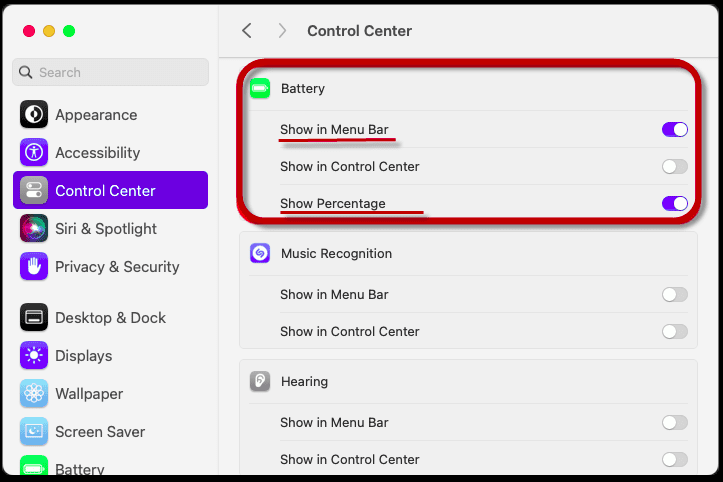
macOS includes Battery Health Management.
What it does:
- Delays full charging to 100%
- Learns your daily charging habits
- Reduces battery stress
Is it effective?
✔ Yes, for most people
❌ Not perfect for heavy users
If you:
- Keep your Mac plugged in all day
- Work long hours
- Use external displays
Then battery optimization helps a lot.
Charging Habits That Quietly Kill Battery Life
This section alone can extend battery life by 1–2 years.
❌ Bad habits:
- Keeping battery at 100% all day
- Letting battery hit 0% frequently
- Using cheap third-party chargers
- Excessive heat while charging
✅ Good habits:
- Keep charge between 20%–80%
- Use original or certified chargers
- Avoid heat (beds, couches)
- Unplug once fully charged (sometimes)
Your Mac battery life opinion in the future depends heavily on this.
Does Fast Charging Damage Mac Battery?
Short answer: Not immediately
Long answer:
- Fast charging creates heat
- Heat = battery aging
- Daily fast charging = faster wear
Best practice:
- Use fast charging when needed
- Avoid making it a daily habit
Think of it like sprinting:
- Useful occasionally
- Harmful if done nonstop
Apps That Drain Mac Battery Faster Than You Expect
Some apps are silent battery killers.
Biggest culprits:
- Google Chrome (multiple tabs)
- Video conferencing apps
- Background cloud sync
- Electron-based apps
Safari is optimized for macOS.
Chrome is not.
This alone changes your Mac battery life opinion dramatically.
Mac Battery Life vs Windows After 2 Years
Here’s an honest comparison after long-term use.
MacBook after 2 years:
- Remains usable unplugged
- Predictable drain
- Stable standby time
Windows laptop after 2 years:
- Faster degradation (varies by brand)
- More background drain
- Inconsistent standby
This is why many users still say:
“Mac battery life ages better.”
Pros of Mac Battery Life (Long-Term Perspective)
✅ Still impressive after years
✅ Predictable degradation
✅ No sudden battery death
✅ Better standby performance
✅ Less dependency on charger
Cons of Mac Battery Life (Long-Term Perspective)
❌ Expensive battery replacement
❌ Non-user replaceable
❌ Heavy workloads drain fast
❌ Fast charging heats battery
❌ Chrome hurts battery longevity
Who Should Care MOST About Battery Health?
Pay extra attention if you:
- Work remotely
- Travel often
- Keep laptop 4–5 years
- Hate battery anxiety
Worry less if you:
- Mostly use it plugged in
- Upgrade every 2–3 years
- Do light usage only
Quick Battery Health Tips
- Enable Battery Health Management
- Use Safari where possible
- Avoid full drain cycles
- Don’t obsess over 100%
- Keep macOS updated
These small habits compound over years.
Why Battery Comparisons Often Mislead
Most online comparisons fail because they rely on:
- Manufacturer claims
- Lab-controlled tests
- Fresh, brand-new devices
But real users don’t live in labs.
They:
- Use Chrome
- Run background apps
- Forget to close tabs
- Work unplugged for hours
So let’s compare how Mac and Windows behave in the real world. Mac battery life opinion
Design Philosophy: The Core Difference
The biggest reason Mac battery life stands out is design philosophy.
🍎 macOS + Hardware (Apple’s Approach)
- One company controls hardware and software
- Fewer device variations
- Tight optimization
Led by Apple, this approach allows macOS to:
- Predict workloads
- Control background tasks
- Optimize sleep and standby
🪟 Windows + Hardware (Open Ecosystem)
- Hundreds of manufacturers
- Different CPUs, batteries, firmware
- Inconsistent optimization
Windows, developed by Microsoft, must work on everything—which is powerful, but inefficient for battery life.
This single difference explains 80% of the battery gap.
Mac vs Windows: Battery Life by Daily Tasks
Here’s a task-by-task comparison based on real usage patterns.
✍️ Writing, Browsing & Research
Mac battery life opinion: Excellent
- 10–12 hours
- Smooth drain
- Minimal heat
Windows laptops:
- 6–8 hours on average
- Faster drops after 50%
- Fans kick in more often
➡️ Winner: Mac
🎬 Video Streaming (YouTube / Netflix)
MacBooks:
- Optimized video decoding
- 8–10 hours consistently
Windows laptops:
- Varies by GPU & browser
- 5–7 hours typical
➡️ Winner: Mac
💼 Office Work + Zoom Calls
Mac:
- Stable performance
- Less heat during calls
- Predictable drain
Windows:
- Zoom + Chrome drains fast
- Fans + heat reduce efficiency
➡️ Winner: Mac (especially for remote work)
🎮 Gaming & Heavy Editing
Here’s where the story changes.
Mac:
- Battery drains fast
- Not designed for unplugged gaming
Windows:
- Dedicated GPUs help
- Still poor battery, but better performance
➡️ Winner: Windows (performance, not battery)
Standby & Sleep: The Hidden Battery Advantage
This is where Mac truly shines.
Mac Standby:
- Close lid at 80%
- Open after 24–48 hours
- Still 75–78% battery
Windows Standby:
- Close lid at 80%
- Open next day
- Sometimes at 60–65%
This is why users feel Mac battery life is better—even when usage hours look similar.
Consistency Matters More Than Maximum Hours
A key insight shaping any honest Mac battery life opinion:
People don’t want the longest battery once.
They want predictable battery every day.
Mac delivers consistency.
Windows delivers variability.
That difference changes user trust.
Battery After 2 Years: Mac vs Windows
Let’s compare aging.
MacBook after 2 years:
- Battery health: ~88–92%
- Still usable unplugged
- Standby remains strong
Windows laptop after 2 years:
- Battery health varies widely
- Standby drain increases
- More frequent charging needed
This aging pattern is why many users switch to Mac and don’t return.
Price vs Battery: Is Mac Worth It?
This is the uncomfortable question.
MacBooks cost more upfront.
But battery life affects:
- Productivity
- Charging habits
- Stress
- Portability
If battery matters daily:
Mac often justifies the price.
If battery is secondary:
A Windows laptop can save money.
Your Mac battery life opinion should depend on how you work, not brand loyalty.
Pros & Cons: Mac vs Windows Battery Life
✅ Mac Battery Life Pros
- Excellent standby
- Consistent daily usage
- Ages gracefully
- Silent efficiency
❌ Mac Battery Life Cons
- Expensive replacement
- Limited gaming unplugged
- Less user control
✅ Windows Battery Pros
- More hardware choices
- Better GPU performance
- Often cheaper
❌ Windows Battery Cons
- Inconsistent drain
- Faster standby loss
- Heavily brand-dependent
Who Wins the Battery War?
Choose Mac if:
- You work remotely
- You travel often
- You hate carrying chargers
- You value consistency
Choose Windows if:
- You game unplugged
- You need GPU power
- You want cheaper options
- Battery is not a priority
Why “Best Battery Life” Depends on the User
Battery life isn’t just about hours.
It’s about:
- How often you plug in
- Where you work
- Whether you move a lot
- How predictable your day is
That’s why two people can use the same MacBook and have very different battery opinions.
Let’s break this down clearly.
Who SHOULD Buy a Mac for Battery Life
🎓 Students & Learners
If you’re a student, Mac battery life feels like freedom.
Why it works well:
- Full day of classes without charging
- Library + hostel usage
- Long standby between sessions
Mac battery life opinion for students:
⭐ Reliable and stress-free
💻 Remote Workers & Freelancers
This is where Mac battery life truly shines.
Ideal for:
- Writers
- Developers
- Marketers
- Consultants
Why:
- Long Zoom calls without panic
- Café work without hunting sockets
- Stable performance unplugged
Many remote professionals stick with Macs purely because of battery trust built by Apple’s ecosystem.
✈️ Frequent Travelers
Travel exposes bad battery fast.
Mac advantages while traveling:
- Airport waiting time coverage
- Long flights (8–10 hours use)
- Minimal overnight drain
Mac battery life opinion for travelers:
⭐ One of the best portable laptop experiences
🧑💼 Office Professionals (Hybrid Work)
If your work includes:
- Documents
- Emails
- Presentations
- Meetings
Mac battery life removes one daily friction point.
You stop thinking about:
- Carrying chargers
- Desk positioning
- Battery anxiety
Who Should AVOID Buying a Mac
Now the honest side.
🎮 Hardcore Gamers
Mac battery life drops fast during gaming.
Problems:
- High drain
- Thermal limits
- Not optimized for unplugged gaming
Verdict:
❌ Not ideal if gaming is a priority
🎥 Heavy Video Editors & 3D Creators
If you do:
- 4K rendering
- 3D modeling
- Long exports
Battery drains quickly.
Yes, Macs are powerful—but battery life won’t feel special under load.
🏢 Enterprise & Legacy Software Users
If you rely on:
- Windows-only apps
- Heavy virtualization
- Custom enterprise tools
Battery life benefits shrink because:
- Virtual machines consume power
- Compatibility layers add overhead
💰 Budget-Conscious Buyers
Macs cost more upfront.
If your priority is:
- Lowest price
- Replaceable battery
- Short-term usage
Then Mac battery life alone may not justify the cost.
Real-Life Scenarios
Scenario 1:
“I work from cafés and travel weekly.”
👉 Mac is worth it
Scenario 2:
“I game, edit videos, and stay plugged in.”
👉 Mac battery advantage is wasted
Scenario 3:
“I want a laptop that lasts all day with no thinking.”
👉 Mac fits perfectly
Pros & Cons
✅ Pros
- Predictable daily battery
- Excellent standby
- Quiet and cool
- Long-term consistency
❌ Cons
- Expensive replacement
- Limited upgrades
- Battery advantage reduces under heavy load
Your Mac battery life opinion should weigh these honestly.
The Big Picture: Why Mac Battery Life Feels Different
When people praise Mac battery life, they’re not just talking about hours.
They’re talking about:
- Trust
- Predictability
- Mental freedom
A Mac doesn’t force you to:
- Watch the battery percentage constantly
- Carry a charger everywhere
- Panic when it hits 40%
That emotional difference shapes the overall Mac battery life opinion more than raw numbers.
Mac Battery Life: Best in Class or Just Good Enough?
🔍 The Honest Answer
Mac battery life is best in class for everyday users.
But it’s only good enough for heavy, performance-intensive users.
Let’s break that down clearly.
✅ Best in Class If You:
- Browse, write, research, and attend meetings
- Work remotely or travel often
- Value standby time and consistency
- Want fewer charging decisions
⚠️ Just Good Enough If You:
- Render videos daily
- Game heavily
- Push CPU/GPU nonstop
- Stay plugged in most of the time
Macs aren’t magic—they’re optimized for balance, not extremes.
Final Pros & Cons Recap
✅ Final Pros
- Reliable all-day battery
- Excellent standby and sleep
- Smooth, predictable drain
- Long-term consistency
- Less battery anxiety
❌ Final Cons
- Battery replacement is expensive
- Not user-replaceable
- Heavy tasks drain fast
- Fast charging can increase wear
A balanced Mac battery life opinion must accept both sides.
Who Wins Overall?
If your laptop is:
- A daily work tool
- A travel companion
- A productivity machine
👉 Mac battery life is genuinely best in class.

If your laptop is:
- A gaming rig
- A rendering workstation
- A plugged-in desktop replacement
👉 Battery life won’t be the reason to buy a Mac.
Frequently Asked Questions (FAQ)
1. Is Mac battery life really better than Windows laptops?
For everyday tasks, yes—especially in consistency and standby time.
2. How long does a Mac battery last in years?
Typically 3–5 years, depending on usage and charging habits.
3. Does macOS battery optimization actually help?
Yes. It slows long-term degradation, especially for plugged-in users.
4. Is it okay to keep a Mac plugged in all the time?
Occasionally yes, but daily long-term plugging can reduce battery health.
5. Does fast charging damage Mac batteries?
Not immediately—but frequent fast charging increases heat and wear.
6. When should I replace a Mac battery?
Usually when health drops below 80% or daily usage feels limiting.
7. Is Mac battery life worth the higher price?
If battery reliability matters daily, many users say yes.
Final Verdict: The Human Truth
Here’s the most honest takeaway:
Mac battery life doesn’t try to impress you every minute—it quietly supports you all day.
That’s why:
- People trust it
- People stop worrying about charging
- People rarely switch back
So no—it’s not hype.
But yes—it’s engineered excellence, not miracles.
If this Mac battery life opinion helped you:
👉 Bookmark this guide for future reference
👉 Share it with someone choosing their next laptop
👉 Explore our other honest Mac & tech experience reviews for real-world insights
Your laptop should work with you—not make you think about charging all day.