Introduction: My Real macOS Experience
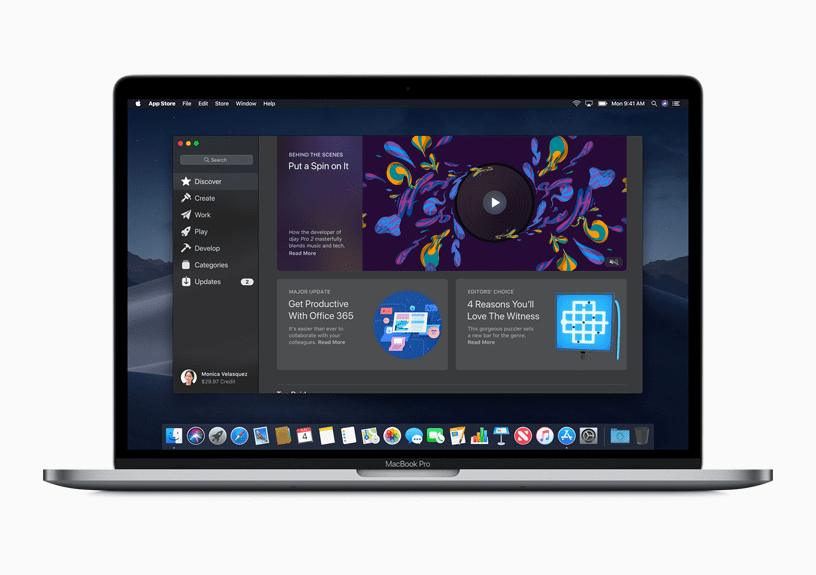
The macOS experience is often described as clean, smooth, and rock-solid.
And honestly, when you first use it, that description feels completely true.
From the moment you open a MacBook, everything feels calm.
No clutter.
No sudden pop-ups.
No aggressive notifications begging for attention.
But after weeks and months of real-world use, a deeper question appears:
Is the macOS experience truly freedom… or just a beautifully controlled environment?
That’s exactly what this blog explores — without fanboy hype or blind criticism.
Think of macOS like a luxury apartment:
- Everything works
- Everything looks elegant
- But you can’t knock down walls whenever you want
Let’s break it down honestly.
Why the macOS Experience Feels So Clean
The first thing most users notice about the macOS experience is how mentally relaxing it feels.
Minimal Visual Noise
- No random ads inside the OS
- No third-party trial software preinstalled
- No unnecessary system alerts
Compared to Windows, macOS feels like walking into a quiet library instead of a busy market.
Consistent Design Language
Apple controls:
- Icons
- Animations
- System sounds
- Gestures
This consistency makes macOS easy to learn subconsciously.
You don’t fight the system — you flow with it.
Real-World Analogy
Using macOS feels like driving a well-tuned automatic car.
You focus on the journey, not the mechanics.
Stability: macOS’s Biggest Strength
Stability is where the macOS experience truly shines.
🛡 Why macOS Rarely Crashes
- Tight hardware + software integration
- Limited hardware variations
- Strong background process control
macOS doesn’t try to support every possible device like Windows does.
This limitation actually improves reliability.

My Personal Experience
- Weeks without restarting
- No random freezes
- Apps recover gracefully after crashes
Even after heavy multitasking — browser tabs, editing tools, background sync — the system stays composed.
🔄 Updates That Don’t Break Things (Usually)
macOS updates:
- Install smoothly
- Rarely break drivers
- Don’t change UI dramatically overnight
This predictability builds long-term trust.
Where the macOS Experience Starts Feeling Limiting
Now comes the uncomfortable truth.
The same control that makes macOS stable also makes it restrictive.
🔒 System-Level Restrictions
macOS decides:
- Which folders apps can access
- What background processes can do
- How much system control third-party apps get
Even simple tasks sometimes require:
- Permission pop-ups
- Manual approvals
- Security overrides
For Power Users, This Feels Frustrating
If you like:
- Deep system tweaking
- Registry-level control (Windows users 👀)
- Experimental software
macOS may feel like it’s holding your hands too tightly.
Simple Example
On Windows:
“Install app → Done”
On macOS:
“Install app → Allow permission → Go to settings → Approve → Restart app”
Secure? Yes.
Convenient? Not always.
Customization: Freedom vs Control
Customization is where opinions sharply divide.
What macOS Allows
- Dark / Light mode
- Dock position & size
- Basic shortcuts
- Wallpapers
What macOS Restricts
- Deep UI theming
- Taskbar behavior changes
- System animations control
- Default app flexibility

Apple believes too much choice leads to chaos.
They choose curation over freedom.
Analogy
macOS is like a five-star hotel room:
- Perfectly designed
- Comfortable
- But you can’t rearrange the furniture
Software Compatibility Reality
The macOS experience strongly depends on what you do.
Excellent For:
- Content creation
- Writing & blogging
- Coding & development
- Video & audio editing
macOS shines with:
- Final Cut Pro
- Logic Pro
- Xcode
- Creative Cloud
Weak For:
- Legacy Windows software
- Certain business tools
- Niche engineering apps
- Hardcore gaming
Even with emulation or virtual machines, the experience isn’t always seamless.
Performance in Daily Life
macOS doesn’t chase benchmark numbers.
It focuses on perceived smoothness.
What You’ll Notice
- Apps open instantly
- Animations feel fluid
- Battery drain is predictable
- Fans rarely spin aggressively
This makes the macOS experience feel effortless rather than powerful.
Important Truth
macOS feels fast not because it’s always faster,
but because it avoids unnecessary background chaos.
Opinion + Experience Summary
After long-term use, my honest macOS experience can be summed up simply:
macOS is calm, reliable, and elegant — but it demands you trust Apple’s way of doing things.
If your workflow aligns with Apple’s philosophy, macOS feels magical.
If not, it can feel restrictive very quickly.
Pros and Cons Snapshot
✅ Pros
- Clean, distraction-free interface
- Excellent system stability
- Smooth updates
- Strong security by default
- Great for creative work
❌ Cons
- Limited customization
- Strict permissions
- Software compatibility gaps
- Can feel controlling for power users
Who Should Buy macOS? (Honest Reality Check)
The macOS experience is not for everyone, and that’s okay.
Apple never designed macOS to be universal.
It’s designed to be focused.
✅ macOS Is Perfect For You If:
- You value stability over experimentation
- You want a system that “just works”
- You dislike constant troubleshooting
- You use your laptop primarily for:
- Writing
- Designing
- Coding
- Studying
- Light-to-medium professional work
macOS rewards users who prefer consistency.
Simple Analogy
macOS is like a reliable daily train.
It may not let you choose every route, but it arrives on time — every day.
Who Should Avoid macOS?
Now for the uncomfortable truth.
The macOS experience can feel suffocating for certain users.
❌ macOS Might Frustrate You If:
- You love deep system customization
- You frequently install experimental software
- You depend on niche Windows-only tools
- You enjoy tweaking performance manually
- You hate asking permission from your OS
If you enjoy control more than comfort, macOS may feel like a beautiful cage.
Real-Life Example
A power Windows user switching to macOS often says:
“Everything looks nice… but why won’t it let me do this simple thing?”
That frustration is real.
macOS for Students: Smooth but Structured
For students, the macOS experience is mostly positive.
Why Students Love macOS
- Excellent battery life
- Fast wake-from-sleep
- No sudden crashes before deadlines
- Smooth note-taking and browsing
macOS creates a low-stress environment, which matters during exams and assignments.
Where Students Feel Limited
- Paid apps instead of free alternatives
- Gaming limitations
- Less flexibility with external tools
macOS works best for academic productivity, not experimentation.
macOS for Professionals: Calm and Predictable
Professionals often appreciate the macOS experience more than students.
Why Professionals Trust macOS
- Stable long work sessions
- Minimal interruptions
- Strong security defaults
- Reliable sleep and resume
macOS is designed for people who cannot afford downtime.
But There’s a Catch
If your job depends on:
- Legacy enterprise software
- Industry-specific Windows tools
You may constantly fight compatibility issues.
macOS is fantastic within its ecosystem, not outside it.
macOS vs Windows: It’s a Mindset Difference
This comparison isn’t about features.
It’s about philosophy.
Windows Philosophy
- User control
- Hardware flexibility
- Endless customization
- Chaos with freedom
macOS Philosophy
- System control
- Hardware harmony
- Predictable behavior
- Order with limits
Analogy
Windows is like owning land — do anything, build anything.
macOS is like living in a gated community — safe, polished, regulated.
Neither is wrong.
They simply serve different personalities.
Daily Productivity on macOS: The Good and the Bad
The macOS experience shines during long, focused sessions.
What Improves Productivity
- Spotlight search
- Smooth multitasking
- Stable background apps
- Gesture-based navigation
Once muscle memory develops, macOS feels effortless.
What Slows You Down
- Strict file access permissions
- App sandboxing
- Limited window snapping without tools
macOS assumes users want simplicity, not speed hacks.
macOS Security: Safe but Sometimes Annoying
Security is deeply baked into the macOS experience.
Strong Security Features
- App sandboxing
- Gatekeeper protections
- Regular silent updates
- Permission-based access
This protects beginners extremely well.
But Advanced Users Feel Restricted
- Constant permission prompts
- Manual overrides required
- Limited low-level system access
Security on macOS feels like a strict security guard:
Helpful, but sometimes overprotective.
Long-Term Use: Does macOS Age Well?
One of macOS’s biggest advantages is aging gracefully.
After 1–2 Years of Use
- System still feels smooth
- No noticeable slowdown
- UI remains consistent
- Battery efficiency remains stable
macOS doesn’t degrade as quickly as many Windows systems.
However…
Older Macs eventually face:
- Dropped OS support
- Limited hardware upgrades
- Forced obsolescence
Longevity exists — but on Apple’s terms.
macOS Pros vs Cons (Deep, Real-World Breakdown)
By now, you can probably feel it:
The macOS experience is a balance between comfort and control.
Let’s go deeper than surface-level pros and cons.
✅ macOS Pros (Beyond the Obvious)
🧩 1. Everything Feels Thoughtfully Connected
macOS doesn’t feel like random parts glued together.
- System apps follow the same design language
- Keyboard shortcuts work everywhere
- Gestures behave consistently
This reduces mental load, especially during long workdays.
👉 You spend more time working and less time figuring things out.
🔋 2. Predictable Performance (Not Just Speed)
macOS rarely surprises you — in a good way.
- Battery drain is stable
- Fans stay quiet
- Apps don’t randomly spike CPU
The macOS experience prioritizes calm performance over raw power.
🧠 3. Excellent for Focused Work
macOS is built for deep work.
- Minimal notifications
- No sudden system interruptions
- Clean full-screen modes
It feels like Apple designed macOS for people who sit down and concentrate for hours.
❌ macOS Cons (The Frustrations People Discover Late)
Now let’s talk about what people usually realize after buying.
🔒 1. Customization Myths vs Reality
Many new users assume:
“I’ll customize macOS later.”
Reality?
macOS allows surface-level customization only.
You can’t:
- Fully redesign UI elements
- Control system animations deeply
- Change task switching behavior freely
Apple believes too much customization breaks consistency.
If customization equals freedom for you, the macOS experience may feel limited.
🪤 2. Simple Tasks Can Feel Complicated
Ironically, macOS sometimes makes simple things harder.
Examples:
- Installing unsigned apps
- Changing default behaviors
- Accessing system folders
You often think:
“Why is this taking so many steps?”
Security and stability are the reason — but friction is the cost.
💰 3. Paid Software Ecosystem
macOS pushes users toward paid apps.
Many excellent tools exist — but:
- Free alternatives are fewer
- Open-source options feel less integrated
Over time, the macOS experience can become expensive.
Customization on macOS: What’s Actually Possible?
Let’s be honest and practical.
What You Can Customize
- Dark / Light mode
- Dock size, magnification, position
- Wallpapers and accent colors
- Keyboard shortcuts (to an extent)
This level suits most users.
What You Can’t Customize Easily
- Start menu–like behavior
- Deep window management
- System animations
- Task switching logic
macOS assumes one best way, not many choices.
Analogy
macOS customization is like choosing clothes from a curated wardrobe — stylish, but limited.
macOS for Creators: Almost Perfect
This is where the macOS experience truly shines.
Why Creators Love macOS
- Color accuracy
- Optimized creative software
- Smooth timeline scrubbing
- Stable long renders
For:
- Video editors
- Music producers
- Designers
- Writers
macOS feels tailor-made.
Apple understands creative workflows deeply — and it shows.
The Hidden Limitation for Creators
- Expensive upgrades
- Limited hardware customization
- Locked upgrade paths
You trade freedom for polish.
macOS for Gamers: Still a Weak Spot
Let’s be blunt.
The macOS experience is not gamer-friendly.
Why Gaming Feels Limited
- Fewer native games
- Poor driver-level control
- Limited GPU support
- Emulation overhead
Even casual gamers notice restrictions quickly.
Reality Check
macOS treats gaming like a side hobby, not a priority.
If gaming matters to you, this is a serious drawback.
Frustration Moments Nobody Talks About
These are the small things that slowly add up.
😤 Common Daily Annoyances
- Window snapping needs third-party tools
- External monitor behavior feels inconsistent
- File management feels restrictive
- Finder lacks advanced controls
None of these are deal-breakers alone.
But together, they shape the macOS experience.
Workarounds: How Users Adapt
Long-term macOS users don’t fight the system — they adapt.
Common Adaptation Strategies
- Learning keyboard shortcuts deeply
- Using Spotlight instead of Finder
- Accepting Apple’s workflow logic
- Installing productivity tools
Over time, macOS becomes easier — but only if you submit to its philosophy.
macOS vs Windows: Long-Term Reality
Most comparisons focus on specs or features.
But the macOS experience vs Windows difference becomes clear only after months or years of use.
Long-Term macOS Experience
- Performance remains consistent
- UI barely changes year to year
- Fewer system errors over time
- Lower mental fatigue
macOS feels predictable, which many users underestimate until they lose it.
Long-Term Windows Experience
- More flexibility
- Broader hardware and software support
- Performance depends heavily on setup
- UI and system behavior change frequently
Windows offers freedom, but that freedom requires maintenance.
Analogy
macOS is like a well-maintained highway.
Windows is like multiple roads — faster sometimes, but more chaotic.
Stability Over Time: Why macOS Ages Gracefully
One reason people praise the macOS experience is how well it ages.
After 2–3 Years
- No major slowdowns
- Fewer crashes
- Stable battery behavior
- Familiar interface
macOS avoids aggressive feature changes that disrupt habits.
The Hidden Trade-Off
- Older devices eventually stop receiving updates
- Hardware upgrades are limited
- Users are nudged toward newer Macs
So yes, macOS ages well — but only within Apple’s lifecycle.
Privacy on macOS: Strong… but Not Absolute
Privacy is a huge part of the macOS experience.
What Apple Does Well
- Transparent permission prompts
- App tracking controls
- Local data processing emphasis
- Minimal data selling
Apple markets privacy as a feature — and mostly delivers.
The Reality Nobody Mentions
- Apple still controls the ecosystem
- System-level data is not fully transparent
- You trust Apple instead of advertisers
macOS privacy is about trusting one company, not total independence.
Simple Truth
macOS reduces external tracking, not platform dependency.
Ecosystem Lock-In: Comfort vs Dependence
The macOS experience improves dramatically inside Apple’s ecosystem.
Why the Ecosystem Feels Amazing
- AirDrop just works
- Clipboard sync across devices
- Calls and messages on Mac
- Seamless file sharing
Once experienced, it’s hard to give up.
The Lock-In Problem
- Best features only work with Apple devices
- Switching platforms feels painful
- Accessories become Apple-specific
Apple doesn’t trap you — it makes leaving uncomfortable.
Analogy
The ecosystem is like a luxury resort.
You’re free to leave — but why would you?
Is macOS Worth the Premium Price?
This is where opinions split the most.
What You’re Paying For
- Hardware + software integration
- Long-term stability
- Premium materials
- Customer support
You’re not just buying a laptop.
You’re buying the macOS experience itself.
What You’re Not Paying For
- Customization freedom
- Gaming performance
- Hardware upgrade flexibility
If these matter to you, the price feels unjustified.
Honest Verdict on Value
macOS is worth the price only if:
- You value stability over flexibility
- You want minimal maintenance
- You work creatively or professionally
- You prefer calm over control
Otherwise, the premium feels unnecessary.
macOS and Productivity Over Years
Over long periods, the macOS experience becomes invisible — and that’s its biggest strength.
Signs macOS Is Working for You
- You stop thinking about the OS
- You rarely troubleshoot
- You trust updates
- You focus more on work
An OS should disappear into the background.
macOS often succeeds here.
Is the macOS Experience Limiting or Liberating?
After long-term, real-world use, here’s the truth:
The macOS experience is liberating for the right user — and limiting for the wrong one.
macOS is not trying to be everything for everyone.
It is intentionally opinionated.
Apple has made a clear choice:
- Reduce chaos
- Reduce user error
- Reduce system instability
In exchange, it limits:
- Deep customization
- Low-level system access
- Experimental freedom
If your personality and workflow align with this philosophy, macOS feels freeing.
If not, it feels restrictive — no matter how powerful the hardware is.
Who Should Buy macOS? (Final Clarity)
✅ You SHOULD Choose macOS If:
- You want a clean and distraction-free OS
- You value long-term stability
- You prefer working over tweaking
- You use your laptop for:
- Writing & blogging
- Design & creative work
- Coding & development
- Office & remote work
- You appreciate polished experiences
- You are okay following Apple’s “way”
For these users, the macOS experience feels calm, reliable, and premium.
Who Should Avoid macOS?
❌ You SHOULD AVOID macOS If:
- You love heavy customization
- You enjoy tweaking system internals
- You rely on Windows-only or niche software
- You are a serious PC gamer
- You want maximum hardware upgrade freedom
- You dislike being told how to work
For these users, macOS will slowly feel confining, not empowering.
Final Pros and Cons (Quick Recap)
✅ macOS Experience – Pros
- Clean and elegant interface
- Extremely stable over years
- Excellent battery optimization
- Strong security by default
- Great for focus and productivity
- Best-in-class ecosystem integration
❌ macOS Experience – Cons
- Limited customization
- Strict system permissions
- Software compatibility gaps
- Expensive ecosystem
- Gaming limitations
- Hardware upgrades are restricted
Final Verdict: Is macOS Worth It?
Here’s the most honest verdict possible:
macOS is not limiting because it’s weak — it’s limiting because it’s controlled.
If you want:
- Predictability
- Calm performance
- Fewer headaches
- Long-term reliability
The macOS experience is absolutely worth it.
If you want:
- Total freedom
- Endless tweaking
- Experimental flexibility
You may feel boxed in.
macOS is a tool, not a playground.
Frequently Asked Questions (FAQ)
❓ 1. Is the macOS experience good for beginners?
Yes. The macOS experience is beginner-friendly due to its clean interface, stability, and strong security defaults.
❓ 2. Is macOS more stable than Windows?
In most long-term scenarios, yes. macOS prioritizes consistency and controlled updates, which reduces crashes and slowdowns.
❓ 3. Does macOS feel limiting after long-term use?
It can, especially for users who like customization, gaming, or deep system control.
❓ 4. Is macOS worth the price in the long run?
Yes, if you value stability, resale value, and long-term performance. No, if you want maximum flexibility.
❓ 5. Is macOS good for programming and development?
Absolutely. The macOS experience is excellent for development, especially for web, mobile, and Unix-based workflows.
❓ 6. Can macOS replace Windows completely?
For most users, yes. For gamers, engineers, and niche software users, not always.
❓ 7. Is macOS secure by default?
Yes. macOS offers strong built-in security, though it sometimes feels restrictive because of it.